
File Prep

Step 1
Ensure the file matches the product’s required dimensions. Ensure that the artwork is created in CMYK 300 dpi with 1/8 (0.125) inch bleeds on all sides.

Step 2
Make sure that all images are embedded, and that all the text is outlined.
Step 3
Export all files into PDF format with bleeds.
Download Setup Guide
File Orientation Guide
How To Set Up Your Files
- Download our guides to ensure a more optimal print result.
- Be sure to DELETE any hidden layers that are not intended to print (ie: setup guide layers or other hidden artwork layers) to ensure no risk of them appearing on the final print.
- Each job (including multiple paged projects) must be submitted as a single PDF file. Ensure that all pages are the same size.
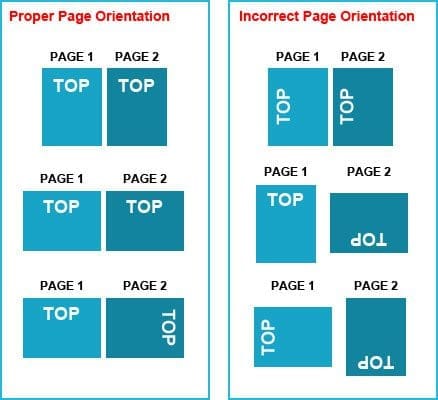
- Files must be submitted with proper orientation to ensure proper back up.
- It is best to try to avoid using borders in your design. If a border is too close to the trim, the trim may be slightly off-center.
- File must consist of 1/8″ bleed and all important art and text must be within the safety margin.
- Ensure that your PDF is high res and that all images are CMYK at 300 DPI.
- Black type should have the following values: C0, M0, Y0, K100.
- Embed or outline all fonts.
- For best colour results, supply a CMYK only files.
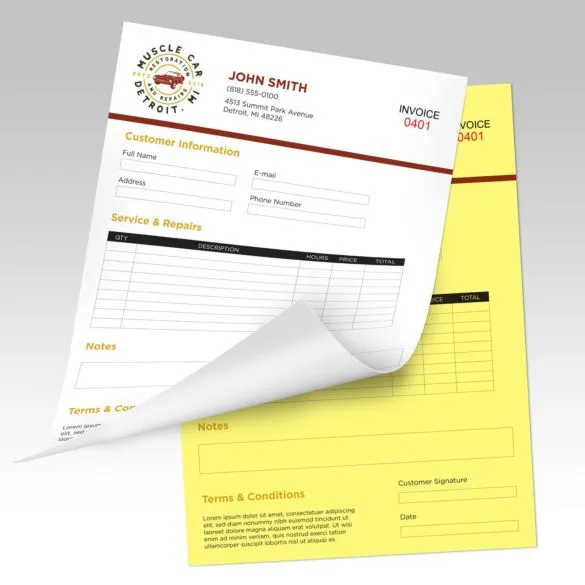
NCR Forms, also known as carbonless forms, are essential for creating instant copies of handwritten or printed documents without the need for carbon paper. They are commonly used for invoices, receipts, work orders, and business records. Available in multiple parts (2-part, 3-part, or more), they provide a clear and professional way to keep records. Custom printing options allow businesses to add logos, branding, and personalized details for a professional touch.
Frequently Asked Questions (FAQs)
What does NCR stand for in forms?
NCR stands for “No Carbon Required,” referring to special paper that creates duplicate or triplicate copies without using carbon sheets.
What are NCR canada used for?
NCR canada are used for invoices, purchase orders, work orders, receipts, contracts, and other business documents that require multiple copies.
How do I print NCR Papaer?
NCR paper can be printed using a laser or offset printer with customized templates, including company details, fields, and branding.
What sizes are available for NCR forms?
Common sizes include 8.5″ x 11″ (letter), 8.5″ x 5.5″ (half-letter), and custom sizes to fit business needs.
Can NCR forms be customized with my logo and business details?
Yes, NCR forms can be customized with logos, contact details, and specific fields to match your business branding and requirements.


Reviews
There are no reviews yet.